You've decided to catalog your comic book collection. Good resolution. But faced with the question "how?", you're confronted with an array of methods: the trusty Excel spreadsheet, the paper notebook, photos on your phone, pro-level Google Sheets, or a specialized app. Each method has its devoted supporters, and its hidden limitations.
You've decided to catalog your comic book collection. Good resolution. But faced with the question "how?", you're confronted with an array of methods: the trusty Excel spreadsheet, the paper notebook, photos on your phone, pro-level Google Sheets, or a specialized app. Each method has its devoted supporters, and its hidden limitations.
This comprehensive comparison analyzes all 5 methods from every angle: time invested, ease of use, scalability, features, cost, and long-term durability. The goal is simple: help you choose the method you'll still be using in 5 years, not the one you'll abandon after 3 weeks.
Why cataloging your collection is non-negotiable
Before comparing methods, let's set the stage. Why catalog at all? Three major reasons:
- Avoid duplicates. Without a catalog, you buy the same issues again. A collector with 300 comics and no catalog buys an average of 8 to 12% duplicates per year, that's 24 to 36 wasted comics.
- Know the real value of your collection. An up-to-date catalog gives you an instant value estimate, useful for insurance, resale, or simply knowing what you actually own.
- Manage wishlists and incomplete runs. Knowing precisely which issues you're missing to complete a series is the key to buying smart.
Method 1, The basic Excel or Google Sheets spreadsheet
Excel / Google Sheets (basic version)
Beginner friendly · Limited at scaleThe classic method. A file with columns: series title, issue number, year, condition, price paid, estimated value. Simple to start, zero cost, accessible to everyone.
Strengths
- Free and universal
- Infinitely customizable
- No account or app needed
- Easy CSV export
- Simple sharing via link
Weaknesses
- Everything is entered manually
- No daily-updated pricing
- Not usable in-store
- Zero automatic duplicate alerts
- No built-in wishlist
- Frequent data entry errors
Estimated time for 200 comics: 6 to 10 hours of manual entry. For each comic, you have to type the title, look up the correct issue number, enter the condition, and manually update prices. Tedious work that kills motivation fast.
Scalability: low. Beyond 300-400 comics, the file gets heavy, formulas multiply to avoid duplicates, and navigation becomes painful. Most collectors using this method end up no longer updating their file after a few months.
Method 2, The paper notebook
Paper notebook
Nostalgic · Unusable beyond 100 comicsThe spiral notebook where you jot down each acquisition by hand. A time-honored method that served generations of collectors before the digital era.
Strengths
- Zero technology required
- Tactile, sensory pleasure
- Impossible to hack or lose online
- Customizable by hand
Weaknesses
- Useless at a flea market (if forgotten at home)
- No search capability
- Impossible to sort or filter
- Corrections = illegible cross-outs
- Prices entirely manual
- Risk of loss or destruction
- No backup
Estimated time for 200 comics: 8 to 15 hours. Handwriting is even slower than typing, and corrections often require rewriting entire pages.
Scalability: none. Beyond 150-200 comics, a paper notebook becomes a source of frustration. Finding a specific issue means flipping page by page. Impossible to tell at a glance whether you already have Amazing Spider-Man #143. This method may have charm for a small number of highly valuable comics, it becomes a burden as soon as the collection grows.
Method 3, Phone photos
Photo gallery (phone or cloud)
Quick to start · Unmanageable past 50 comicsPhotographing each cover and storing the images in an album named "Collection." Tempting for its initial speed, catastrophic over time.
Strengths
- Very quick to set up
- Visual, you see the covers
- Zero text entry
Weaknesses
- No text data (title, number, condition)
- Search by image impossible
- Zero pricing, zero estimated value
- Sorting and filtering impossible
- Photos lost if phone breaks
- Takes up enormous storage
- Unusable in-store for checking
This method is often used as a temporary starting point, "I'll take photos while I figure out something proper." The problem: that "temporary" often lasts years, and you end up with 800 cover photos with zero organization.
Scalability: nonexistent. Impossible to tell if you have Amazing Spider-Man #252 without scrolling through 600 photos one by one. This method isn't cataloging: it's a visual archive with no real practical use.
Method 4, Advanced Google Sheets (with formulas)
Advanced Google Sheets
Powerful on paper · Complex to maintainThe evolved version of the spreadsheet: conditional formulas, multiple tabs, data validation, duplicate alerts, automatic formatting. Requires solid Sheets skills.
Strengths
- Free (Google account)
- Multi-device sync
- Powerful filters and sorting
- Deduplication formulas possible
- Easy collaborative sharing
- Custom value charts
Weaknesses
- Requires advanced spreadsheet skills
- Time-consuming formula maintenance
- No barcode scanner
- Manual pricing (no API)
- Poor mobile interface
- No wishlist synced with the collection
- A formula bug can corrupt the entire file
Estimated time for 200 comics: 10 to 20 hours (including formula setup). This is the method that requires the most initial investment. Ongoing maintenance is also more demanding, each formula update can break other cells.
Scalability: medium. Technically capable of handling thousands of rows, but maintenance becomes a real part-time job. Many collectors who invested hours in their advanced Google Sheets end up letting it degrade due to lack of motivation to maintain it.
The problem with all manual methods: prices change. An Amazing Spider-Man #300 was worth $150 in 2019, $600 in 2021 after the Venom movie announcement, and hovers around $200-250 today. A spreadsheet never captures these fluctuations, you're always working with outdated data.
Collecting this series?
Track what you own, what you are missing and what your collection is worth. 7 day trial.
Start my trial →The method that takes 10x less time
Scan a barcode, and the comic is in your collection. Daily-updated pricing, synced wishlist, zero duplicates. My Comics Collection does in 10 seconds what takes 10 minutes with a spreadsheet.
Try for free →7-day trial
Method 5, The dedicated comics app
Dedicated app (My Comics Collection)
Recommended · Scales without limitsAn app built specifically for comic book collectors: barcode scanner, database of millions of issues, daily-updated pricing, smart wishlist, optimized mobile access.
Strengths
- Ultra-fast barcode scanner
- Daily-updated pricing
- Automatic duplicate detection
- Wishlist synced with the collection
- Optimized mobile access (store, flea market)
- Collection readable offline in the mobile app
- CSV export to spreadsheet if needed
- Total collection value in one click
- Price history
Weaknesses
- Requires a smartphone
- Depends on the app's database for very rare comics
- Less free-form customization than a homemade spreadsheet
Estimated time for 200 comics: 30 to 90 minutes with the scanner. The majority of modern comics (post-1970) have a UPC barcode that scans in 2 seconds. For older comics, searching by title + number takes 10 to 15 seconds. A time savings of 10x to 20x compared to manual methods.
Scalability: excellent. Whether you have 50 or 5,000 comics, the experience stays the same. No formulas to maintain, no crashing files, no manual price updates. The app handles everything in the background.
The comparison table
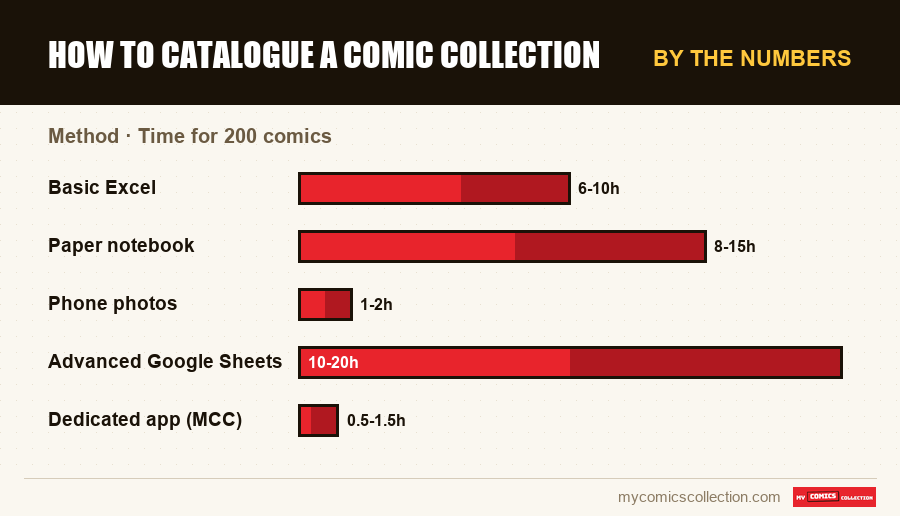
| Method | Time for 200 comics | Daily-updated pricing | Barcode scanner | Anti-duplicate | Mobile | Scalability |
|---|---|---|---|---|---|---|
| Basic Excel | 6-10h | No | No | Manual | Partial | Low |
| Paper notebook | 8-15h | No | No | No | No | None |
| Phone photos | 1-2h | No | No | No | Partial | None |
| Advanced Google Sheets | 10-20h | No | No | Formulas | Partial | Medium |
| Dedicated app (MCC) | 0.5-1.5h | Yes | Yes | Auto | Optimized | Excellent |
The true hidden cost of each method
The cost of a method isn't limited to the price of the tool. You need to factor in the cost of your time : your time has value.
If you value your time at $15/hour (which is reasonable), cataloging 200 comics with an advanced spreadsheet (15 hours) represents $225 in time value. The same task with an app and a scanner takes 1 hour: $15 in time value. The difference, $210, easily justifies the subscription to a dedicated app.
On top of that, add the cost of duplicates bought because your collection isn't up to date. One collector in three buys at least 5 duplicates per year. At an average of $10 per comic: $50 of avoidable waste annually.
How to migrate from your current method
Currently using a spreadsheet and want to switch to a dedicated app? The process is simpler than you might think:
Migrating from Excel/Google Sheets to My Comics Collection
- Export your spreadsheet as CSV (File > Download > CSV)
- Import the CSV into My Comics Collection via the import function
- Before you confirm, the app shows how many rows are new and how many update comics already in your collection
- Typical migration time: 30 minutes to 2 hours depending on your collection's size and the quality of your original spreadsheet
For collectors starting from scratch (paper notebook or photos), the only option is to re-catalog. But with the scanner, re-cataloging 300 comics takes less than 2 hours, versus 15+ hours with a spreadsheet.
Frequently asked questions
Switch to the method that scales with your collection
My Comics Collection brings together everything you need: barcode scanner, database of millions of comics, daily-updated pricing, smart wishlist, and mobile access. Your collection deserves better than a spreadsheet.
Start for free →No charge during trial · Instant access